AR-Guided Robot Data Collection
ENEE759N Course Project — Guoheng Sun
Motivation
Imitation learning requires diverse demonstration data to train robust manipulation policies. However, human operators inevitably introduce systematic biases during data collection.
Even in the simplest tasks, human behavior is far from uniform. Towse et al. (2014) showed that when people are asked to generate random number sequences, their outputs are systematically biased — adults tend to prefer smaller numbers, and digits 1–3 are especially overrepresented. If humans cannot produce unbiased randomness in a one-dimensional number line, it is unreasonable to expect them to uniformly cover a high-dimensional configuration space when teleoperating a robot arm.
In practice, this manifests as:
- Repeating comfortable grasp angles over and over
- Favoring certain approach directions while neglecting others
- Having no awareness of what has already been collected after hundreds of demos
This leads to redundant data and trained policies that fail on unseen configurations.
Our solution: Overlay real-time spatial guidance in AR while the operator teleoperates, so they can see what they've collected and where coverage gaps remain. Randomized target placement further encourages diverse approach strategies.
Reference: Towse, J. N., Loetscher, T., & Brugger, P. (2014). Not all numbers are equal: Preferences and biases among children and adults when generating random sequences. Frontiers in Psychology, 5, 19.
System Architecture
The system consists of three hardware modules connected via two networks:
| Module | Role |
|---|---|
| Meta Quest 3 | AR headset worn by the operator. Captures hand motion, sends velocity commands, and renders trajectory visualization through passthrough. |
| NVIDIA Jetson Thor | On-robot compute. Bridges VR commands to the robot arm, reads end-effector state, and streams it back to Quest 3. |
| UFactory xArm | 6-DOF robot arm with gripper. Executes Cartesian velocity commands and reports end-effector pose relative to its base. |
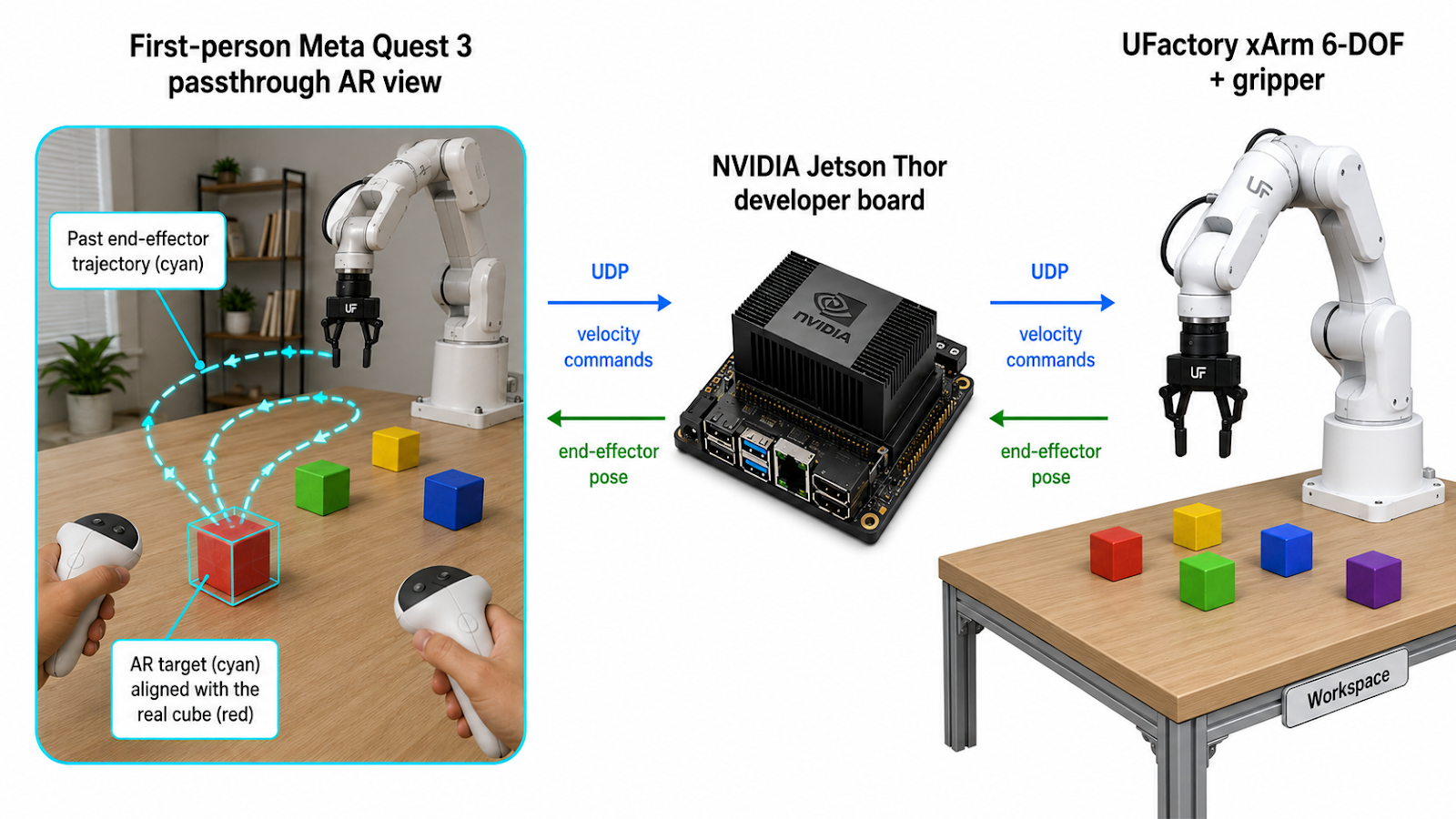
Image generated by OpenAI Image2
Implementation in Unity
The Unity project runs on Quest 3 using:
- Meta XR SDK — OVRManager, passthrough layer for AR view
- XR Interaction Toolkit — Controller input via InputDevice API
- Universal Render Pipeline (URP) — Transparent/unlit materials for AR overlays
Four scripts handle the full pipeline:
- PassthroughSetup.cs — Enables camera passthrough so the operator sees the physical world
- VRHandToROS.cs — Reads controller motion, computes relative velocity, sends UDP packets to Jetson
- RobotBaseCalibration.cs — Calibration, trajectory rendering, gripper markers, and target cube management
- bridge_ghsun.py (Jetson) — Translates UDP to ROS2 velocity commands, controls gripper, streams EE position back
Workflow
1Hardware Setup
Power on xArm and connect Jetson via Ethernet. Connect Quest 3 to Jetson via WiFi Direct. Launch the xArm ROS2 driver and bridge_ghsun.py on Jetson. Deploy the Unity app to Quest 3.
2Calibration
Put on the headset — the real world is visible through passthrough. Place the left controller at the robot arm's base, pointing toward the robot's forward direction. Press X to calibrate.
This establishes the coordinate mapping between the robot's Cartesian frame and the AR world. RGB axes appear at the origin (Red = X/forward, Green = Y/left, Blue = Z/up), and the first target cube is generated at a random reachable position.
3Place Physical Object
A small semi-transparent colored cube with a numbered label and black wireframe edges appears in AR at a random position on the table. The operator takes a real physical cube and places it at the indicated position, aligning it with the AR overlay.
4Grasp Demonstration
The operator teleoperates the robot to grasp the cube. Hold the right trigger to engage — hand motion maps to robot velocity. Press right grip to close/open the gripper.
While teleoperating, the system renders real-time visual feedback:
| Red sphere | Current end-effector position (live indicator) |
| Cyan line | Trajectory of the end-effector during this trial |
| Blue cube | Position where the gripper closed (grasp point) |
| Yellow cube | Position where the gripper opened (release point) |
5Next Trial
After completing a grasp, press A to stop recording. The trajectory line is frozen in place. The operator can now freely reposition the arm to a new starting pose without drawing any trajectory.
Press A again — the previous target cube fades out, a new target appears at a different random location with the next number, and trajectory recording resumes. Place the physical cube at the new position and repeat.
All historical trajectories remain visible, giving a cumulative view of spatial coverage across trials.
Press Y at any time to clear all visualizations and start fresh.
Why This Matters
By making the operator aware of their collection history in real time, the system naturally encourages diverse approach angles and grasp strategies. The combination of AR trajectory visualization and randomized target placement reduces the spatial bias inherent in human demonstration, producing more diverse training data and ultimately more robust imitation learning policies.